Bolded Font for Unread Threads

LionJim

Heisman
Oct 12, 2021
14,217
19,887
113
On the old board, if you had already read through the posts in a single thread then the Thread Title was left in normal, unbolded, font. Here, every Thread Title is bolded so there’s no way of knowing if you’ve exhausted all the posts in a particular thread.
 

Pocono Lion

All-Conference
May 29, 2001
2,247
4,031
113
On the old board, if you had already read through the posts in a single thread then the Thread Title was left in normal, unbolded, font. Here, every Thread Title is bolded so there’s no way of knowing if you’ve exhausted all the posts in a particular thread.
I noticed that too, it was one of the features on the old board that I liked.
 

WDLion

Senior
Dec 18, 2006
391
608
93
On the old board, if you had already read through the posts in a single thread then the Thread Title was left in normal, unbolded, font. Here, every Thread Title is bolded so there’s no way of knowing if you’ve exhausted all the posts in a particular thread.
It also doesn't give you alerts when somebody replies to your post or adds to the thread. The only alerts you get are likes.
 

Midnighter

Heisman
Jan 22, 2021
11,672
19,309
113
It also doesn't give you alerts when somebody replies to your post or adds to the thread. The only alerts you get are likes.

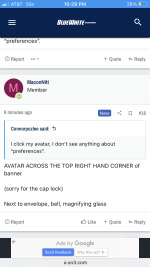
You can adjust your settings/notifications in your 'Preferences' tab when you click your avatar. From there, you can select what kind of notifications you receive. So, you can set it to receive a notification when someone replies to you, when someone mentions you, and when someone replies to a thread you are 'watching' (you can 'watch' a thread by selecting 'watch' on the top right).
 
Last edited:

AvgUser

All-Conference
Jul 12, 2016
1,338
1,822
113
I don’t think the mouse over works here either. If so tell me how please. I used that as a screen to determine if I wanted to even open up a cryptic thread title.
 

WDLion

Senior
Dec 18, 2006
391
608
93
You can adjust your settings/notifications in your 'Preferences' tab when you click your avatar. From there, you can select what kind of notifications you receive. So, you can set it to receive a notification when someone replies to you, when someone mentions you, and when someone replies to a thread you are 'watching' (you can 'watch' a thread by selecting 'watch' on the top right).
Got it. Thanks.
 
  • Like
Reactions: Midnighter

Connorpozlee

All-American
Aug 29, 2013
3,182
6,237
113
You can adjust your settings/notifications in your 'Preferences' tab when you click your avatar. From there, you can select what kind of notifications you receive. So, you can set it to receive a notification when someone replies to you, when someone mentions you, and when someone replies to a thread you are 'watching' (you can 'watch' a thread by selecting 'watch' on the top right).
I don’t see where this is an option.
 

RyanSnyder

Hall of Famer
Staff member
Nov 2, 2013
34,861
172,007
113
It also doesn't give you alerts when somebody replies to your post or adds to the thread. The only alerts you get are likes.

We sent that into the tech team today. Like I mentioned yesterday, there are going to be small things that just simply take time. The thread topic is a good example. That's something we brought up as well.

The site is three months old. It took Rivals/247 well over a year to reach the finished product it is today. Just be patient with us. We're chipping away at all of that.