Feature Requests

BenSherman

Heisman
Staff member
May 30, 2022
3,622
20,650
113
Several thoughts:
- I didn't understand how Search worked until I came to this thread. (Looks very easy!). So should there be a Tutorial pinned on the first forum page? Not only how to Search, but other commonly asked questions. Maybe call it FAQ.
- Took me awhile before I discovered all the extra features within the options line (Bold, Italics, Font size, etc). I didn't think to click on the three dots -- and there's three places with three dots. As a result I couldn't find how to gif for awhile. Something for Tutorial/FAQ?
- The gif feature was disappointing to use because the gifs in the menu were practically thumbnails, and hard to read whatever text was in the videos. So can the whole thing be enlarged?
- Speaking of enlarging, the whole board looked tiny and uninviting (Chrome on a laptop) until I increased the size to Extra Large. So should the default be larger? Or something to explain in the FAQ?
- The buttons -- I think they are called breadcrumbs -- are tiny. Making them larger would make them easier to find and also easy to click on.
- When I came looking for the Feedback Forum I clicked on Forums at the top; the dropdown showed 8 boards but not the Feedback Forum; I had to go to Lobby and try again. Since there are only 10 boards, why not put them all in the dropdown?
Thanks!
Thanks for all of these. Will review and reassess.

A tutorial for all is a good idea, I'm just not sure if we can cover everything since it varies by platform - lots of permutations. There's desktop, mobile, app ...
 
  • Like
Reactions: IowaTarHeel

IowaTarHeel

Senior
Jul 7, 2025
401
853
93
Just now on the Seth Trimble Feels Duty thread, I tried to attach a picture. Clicked the "attach files" but that only puts on a thumbnail. So I hunted around and found an "attach image" option, that was a larger picture. This needs clarity; perhaps instructions on how to attach an image correctly in an FAQ.

But gee, the picture is small, much smaller than on the old board. Just contributes to the overall feel that this is an old-fashioned, unflashy board -- when I understand that the technology is actually superior.

And now I can't edit out the tiny attachment.

Thanks for your help.
 

5782unc9305

Senior
Jul 30, 2025
288
820
93
Helpful to see this is happening to you on the mobile browser version. Trying to run some tests here to see if it's about the back button vs. using the board navigational tools so that when you go back to the thread index the changes you've made are documented. I've gotten into the habit of using the app on my phone and the navigational tools on that and on desktop, so I may be experiencing it differently.
Hey Ben - any update on this one? Thanks!
 

5782unc9305

Senior
Jul 30, 2025
288
820
93
Seems when using breadcrumbs the read threads are registered, but not with back button. Same for you?
Haven’t noticed that, no. I usually navigate from a thread back to the board using either the bookmark in my browser or the link at the bottom of the thread. I’m still thinking it’s my hypothesis that threads “re-bold” anytime there’s a new post in the thread, even if you’ve viewed that thread before. That’s the only pattern I’ve noticed - thread titles stay “unbolded” if I’ve viewed them and there’s no new posts since my last time viewing the thread.
 

BenSherman

Heisman
Staff member
May 30, 2022
3,622
20,650
113
Haven’t noticed that, no. I usually navigate from a thread back to the board using either the bookmark in my browser or the link at the bottom of the thread. I’m still thinking it’s my hypothesis that threads “re-bold” anytime there’s a new post in the thread, even if you’ve viewed that thread before. That’s the only pattern I’ve noticed - thread titles stay “unbolded” if I’ve viewed them and there’s no new posts since my last time viewing the thread.
Think you're right on that - bold denotes new posts in a thread.
 

5782unc9305

Senior
Jul 30, 2025
288
820
93
Think you're right on that - bold denotes new posts in a thread.
Is that an intentional decision / any chance there’s openness to revisiting that? It didn’t work that way on 247. There’s already a big “NEW” moniker that denotes that. And it makes it difficult to keep up with which threads you’ve already viewed.
 

BenSherman

Heisman
Staff member
May 30, 2022
3,622
20,650
113
Is that an intentional decision / any chance there’s openness to revisiting that? It didn’t work that way on 247. There’s already a big “NEW” moniker that denotes that. And it makes it difficult to keep up with which threads you’ve already viewed.
Will put it on the list.
 
  • Love
Reactions: 5782unc9305

Stillimaheelsfan

Sophomore
Jul 30, 2025
30
106
33
Has anyone suggested moving the “back”, “forward” and “refresh” buttons to the bottom….or adding them there? Just makes it easier when using the app on a phone. You can operate jt with one hand.
 

altmin

All-Conference
Moderator
Jun 16, 2025
728
1,021
93
I wouldn't mind if they utilized the feature that the software has to detect the setting of the computer or phone you are on and automatically utilize normal/ dark mode of the board theme.
 

cr333

Senior
Jul 22, 2025
398
561
92
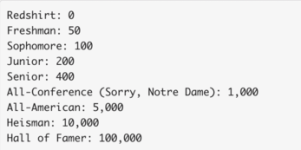
altmin, what are the rating criteria for frosh, sophomore, junior, etc.
Ben said he thought you knew.
 

altmin

All-Conference
Moderator
Jun 16, 2025
728
1,021
93
altmin, what are the rating criteria for frosh, sophomore, junior, etc.
Ben said he thought you knew.
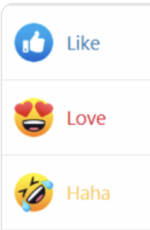
per On3 it's number of like, laugh and love reactions you receive from other people.

image.pngScreenshot 2025-11-04 at 5.34.38 PM.png
 

tarheelbrown

Senior
Jul 22, 2025
412
787
93
Can we have an extended page for the News Feed? I click on "show older items", and that works fine, but when i return to the News Feed page after reading an older post, it has reset to the original shorter list. If I'm checking a lot of older posts, then I have to expand the page every time and then scroll to find the post I last checked. It would be nice to choose how many posts you want to show on News Feed as a default (10, 20, 50, etc...). Alternatively, it would be nice to at least return to the same spot on the News Feed after reading an old post. Make sense?
 

BenSherman

Heisman
Staff member
May 30, 2022
3,622
20,650
113
It does. Need to couple that with the pitch (after football season) to transform the whole news feed/notifications setup because we'd benefit from it being more streamlined.
 
  • Like
Reactions: tarheelbrown

awldune

Junior
Aug 1, 2025
138
317
63
Don't know if it has been suggested before, but it would be cool if we could have the favicon for this site/forum be Carolina blue. Is that something On3 would let you do? Seems like it might be easy to sell them on the concept of each school having their own color.
 

BenSherman

Heisman
Staff member
May 30, 2022
3,622
20,650
113
Don't know if it has been suggested before, but it would be cool if we could have the favicon for this site/forum be Carolina blue. Is that something On3 would let you do? Seems like it might be easy to sell them on the concept of each school having their own color.
Can you point me to which icon this is you're referring to?
 

kellyth2

Joined Aug 10, 2008
Aug 10, 2008
9
5
3
Going to revisit the request list with On3 after the new year. Focus has been on the season and content.
If able, please emphasize being able to organize posts by “staff only”. That feature was awesome on the prior site and doesn’t seem like it’d be too difficult to implement.

I’ve found myself reading less and less threads and generally visiting the site less without this feature. Today for instance, there’s a thread on Tyler Thompson entering the portal and it has already reached 8 pages. I see on the 8th page that Greg Barnes commented somewhere in there and it’s a great tidbit about the move not being financial related, but it’s so time consuming to scan every post on those long threads to find the Barnes post (or McMillan on a basketball recruit thread that may be 40+ pages). Some 6+ page threads are full of good details and staff dropping into clarify things or add further info/answer questions, while other 6+ page threads are just long because they’ve devolved into bickering or other topics.

Thanks!
 
  • Like
Reactions: thegreatestdonut

gfd704

Sophomore
Aug 1, 2025
53
187
33
Reiterating the above post - the absence of a “Staff” filter is a massive negative and one of the few clear downgrades from 247 to On3. It makes navigating large threads a chore and leads to me spending significantly less time on the boards.

Really hope On3 prioritizes this in 2026 and that this isn’t just lip service.
 

altmin

All-Conference
Moderator
Jun 16, 2025
728
1,021
93
Just now on the Seth Trimble Feels Duty thread, I tried to attach a picture. Clicked the "attach files" but that only puts on a thumbnail. So I hunted around and found an "attach image" option, that was a larger picture. This needs clarity; perhaps instructions on how to attach an image correctly in an FAQ.

But gee, the picture is small, much smaller than on the old board. Just contributes to the overall feel that this is an old-fashioned, unflashy board -- when I understand that the technology is actually superior.

And now I can't edit out the tiny attachment.

Thanks for your help.
It is best not to use the attach files button. I would actually prefer if they removed it, but On3 doesn't let me drive.

Photos work best if you you use this button when composing your message. Sorry it took me so long to reply to this one. I missed it the first time I read past it.

Screenshot 2025-12-23 at 8.32.28 AM.png
 

IowaTarHeel

Senior
Jul 7, 2025
401
853
93
It is best not to use the attach files button. I would actually prefer if they removed it, but On3 doesn't let me drive.

Photos work best if you you use this button when composing your message. Sorry it took me so long to reply to this one. I missed it the first time I read past it.

View attachment 1089750
I know you're busy; thanks for the response.

Any chance of getting bigger images?
 

altmin

All-Conference
Moderator
Jun 16, 2025
728
1,021
93
Reiterating the above post - the absence of a “Staff” filter is a massive negative and one of the few clear downgrades from 247 to On3. It makes navigating large threads a chore and leads to me spending significantly less time on the boards.

Really hope On3 prioritizes this in 2026 and that this isn’t just lip service.
Since I have no power over what On3 does to implement features, I have created my own slapdash way to deliver what you want, but will take a few steps on your part if you want to give it a try. Right now I can only get it to work in browsers on computers, in Safari on iPhone, and theoretically on Edge browser on an Android (I can't test it personally, hence theoretically). It will not work in the IC APP. Once setup, I find it works perfectly.

Instructions found here:


altmin

All-Conference
Moderator
Jun 16, 2025
728
1,021
93
I know you're busy; thanks for the response.

Any chance of getting bigger images?
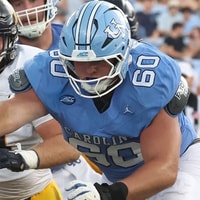
I think there is a 5 or 10MB limit to photos now but I don't think they can go bigger than what it defaults pastes in as. You can drag the corners to go smaller, but not larger. Once posted, if you click the photos, they will zoom to full size though. You can try with this one. You can click once on it to pop it out of the message, then click again to see it in full size.

iStock-183426908.jpg
 
  • Like
Reactions: IowaTarHeel

IowaTarHeel

Senior
Jul 7, 2025
401
853
93
I think there is a 5 or 10MB limit to photos now but I don't think they can go bigger than what it defaults pastes in as. You can drag the corners to go smaller, but not larger. Once posted, if you click the photos, they will zoom to full size though. You can try with this one. You can click once on it to pop it out of the message, then click again to see it in full size.

View attachment 1093713
Right, though I was asking if the image displayed automatically within the thread could be larger. Seems to be a good bit smaller than we had on the other site. This takes away from the visual impact and attractiveness of this site.
 

IowaTarHeel

Senior
Jul 7, 2025
401
853
93
I also would like live links in a bold font, not this condensed font. Though I learned on day one that links would be in a condensed font, I still overlook some because it looks too much like the regular font.
 

altmin

All-Conference
Moderator
Jun 16, 2025
728
1,021
93
Right, though I was asking if the image displayed automatically within the thread could be larger. Seems to be a good bit smaller than we had on the other site. This takes away from the visual impact and attractiveness of this site.
I think it has been limited by the enormous annoying side bar then no one wants.

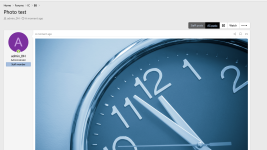
look at how the photos appear on my test server for the forum software that I setup at home:

Screenshot 2025-12-26 at 2.40.29 PM.png
 
  • Like
Reactions: IowaTarHeel