Adding an avatar

DJ Spanky

Heisman
Jul 25, 2001
48,149
59,039
113
This worked for me.

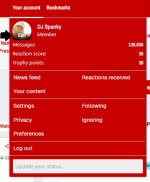
Open your profile, you'll see where you avatar goes (now a letter) in the upper left. Hover the mouse over that spot and you should see the word "Edit" show up.

Here's a shot:
On3 Avatar Shot.jpg

Select that button and it will allow you to upload an avatar photo.
 
  • Like
Reactions: iReC89 and Smols

RULoyal

Heisman
Jul 28, 2001
15,450
18,630
113
Zoe Saldana Animation GIF
 

NBHPRU

Junior
Aug 23, 2021
342
327
63
This worked for me.

Open your profile, you'll see where you avatar goes (now a letter) in the upper left. Hover the mouse over that spot and you should see the word "Edit" show up.

Here's a shot:

View attachment 832980

Select that button and it will allow you to upload an avatar photo.
Mine displays at 90 degrees from the original and doesn't fill the frame. Can this be corrected or do I have to choose another photo?
 

DJ Spanky

Heisman
Jul 25, 2001
48,149
59,039
113
Mine displays at 90 degrees from the original and doesn't fill the frame. Can this be corrected or do I have to choose another photo?

If you have the image on your computer, I believe that Windows Explorer allows you to right click on the image file and rotate it.
 
  • Like
Reactions: runrutgersrun

RUBob75

All-Conference
Feb 5, 2003
976
1,174
93
This worked for me.

Open your profile, you'll see where you avatar goes (now a letter) in the upper left. Hover the mouse over that spot and you should see the word "Edit" show up.

Here's a shot:

View attachment 832980

Select that button and it will allow you to upload an avatar photo.
Thanks for the assistance!!!
 

DJ Spanky

Heisman
Jul 25, 2001
48,149
59,039
113
Wanted to bump this as I see a lot of people who recently got straightened out still haven't set up their avatar.